Cardmarket Price Updater
Automatically get prices for MTG, Pokemon and Yu-Gi-Oh! cards
I collect Yu-Gi-Oh! cards on and off, I have since I was a kid. I recently wanted to complete my set of every Red-Eyes Black Dragon card ever printed after getting the NKC1-EN002.
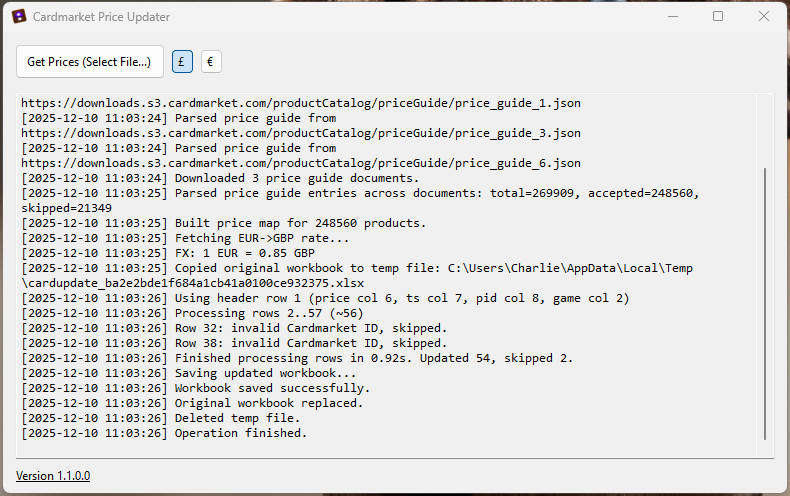
So to help do that I wrote this program that will get prices based on the current prices on Cardmarket which is a European version of TCGPlayer.
It’s pretty easy to setup, if you have a big list of cards like I did it will take a while to go through initially but after that is all done it’s pretty useful.
The program will get all the details it needs from a provided Excel shreadsheet that you can fill out and add to yourself, I use it for every single Red-Eyes Black Dragon printed in English, along with a few OCG cards that I want. It then writes to that sheet with updated prices and also the date it got the price so you know how current it is. Currently it gets an average price from all printings (1st Edition, Unlimited, etc.) but I will look to replace that with just 1st Edition in the future as most collectors just care about that.
All the instructions are on the repo page.
Here’s the repo below.


Changelog
Latest Update
Version 2.1.0.0
- 2.1.0.0 The
Gamecolumn is now optional. If a sheet has no Game column, every row uses the default game, which is Yu-Gi-Oh! unless you choose another. - 2.1.0.0 Added a game dropdown to the GUI and a
/gflag to the CLI (/g yYu-Gi-Oh!,/g mMagic: The Gathering,/g pPokémon) to choose the default game. The choice is remembered asdefaultGamein the config file. - 2.1.0.0 Prices are now checked against the correct game for each row instead of all three games at once, and only the price guides for games actually in your sheet are downloaded. Blank or unrecognised Game cells fall back to the default game.
- 2.1.0.0 Fixed a temp file being left behind when the required column headers could not be found.
- 2.1.0.0 Fixed the README config example using the wrong (PascalCase) key names.
Older Updates
Version 2.x - The .NET 8 / Avalonia Update
Version 2.0.3.2 / 2.0.3.1 / 2.0.3.0
- 2.0.3.2 Fixed Flatpak crash due to missing argument in dotnot build command.
- 2.0.3.1 Fixed the Linux CLI release workflow failing with a 403 - it was missing the
contents: writepermission the other two release workflows already had, so it couldn’t create/attach to the release. - 2.0.3.1 Moved
update.xmlback to the repo root (pre-2.0 installs expect it there) and updated the update-checker URL, docs, and project layout references to match. - 2.0.3.1 Fixed a few leftover references to the old hyphenated repo name (
Cardmarket-Price-Updater) in the README and update-checker URL, pointing them at the currentCardmarketPriceUpdater. - 2.0.3.0 Added a self-contained Linux
linux-x64CLI build, published alongside the exe and Flatpak on every release - lets headless/server users run the CLI directly with no Flatpak, GUI runtime, or display required. - 2.0.3.0 Releases are now fully automated: pushing a version tag (
vx.x.x.x) builds and attaches the Windows exe, the Flatpak bundle, and the Linux CLI tarball to the release, no manual upload needed. - 2.0.3.0 Fixed
packaging/flatpak/io.github.professorshroom.CardmarketPriceUpdater.yml- it was still cloning an old hyphenated repo name pinned tov2.0.2.0instead of building from your local checkout. It now builds from a local publish output, matching what the packaging docs always said it did.
Version 2.0.2.0
- Removed Flathub compliance, it’s too strict and not worth the hassle.
Version 2.0.1.0
- Flathub compliance fixes for the Flatpak packaging (metadata/manifest cleanup) - no functional changes to the app itself.
Version 2.0.0.0 - The .NET 8 / Avalonia Update
- Rewrote the GUI in Avalonia instead of WinForms, so it now runs on Linux (Ubuntu/Fedora, packaged as a Flatpak) as well as Windows, from one shared codebase.
- Added USD ($) as a third currency alongside GBP and EUR.
- Downloads now retry automatically with backoff instead of failing the run on one bad request.
- Backups are now timestamped and kept in a
Backupsfolder with automatic pruning, instead of a single overwritten.bakfile. - Added a small JSON config file for default currency/price type and retry/backup settings, created automatically on first run.
- Replaced AutoUpdater.NET.Official (which required WinForms and blocked a Linux build entirely) with a small built-in update checker on Windows - it now shows a “new version available” link instead of silently self-updating.
Version 1.x - The Initial Release
Version 1.4.0.0
- Changed quiet mode to actually hide the CLI completely.
- Added auto update feature.
Version 1.3.0.0
- Updated GUI to a more modern look.
- Added support to select pricing model; Trending Price, 7-Day Average Price and 30-Day Average Price. By default, it is set to 30-Day Average Price, but you can change it to Trending or 7-Day Average Price if you want a more stable price.
Version 1.2.0.0
- Added cmd/terminal support.
- /f lets you specify a file.
- /d lets you specify a directory.
- /c lets you specify a currency.
- /log lets you log to a file.
- /q, /quiet, /s, /silent runs the exe silently.
Version 1.1.2.0
- Updated EUR to GBP conversion link.
Version 1.1.1.0
- Moved Version/Readme link to professorshroom.com
Version 1.1.0.0
- Added Game to spreadsheet to specify the card game.
- Will now check prices against the correct game instead of checking all.